Blog

29/12/2022 22:50

Want to set Bios to ACHI for C4 or C5 - How to do?

Recently some buyer ordered the MB STAR C4 C5 With Doip from us,and they told us when they use 2 or 3 hours then crashed, could not work any more.Our engineer said need set the Bios to ACHI.

If you do not know how to set the Bios to the AHCI ,Pls check as following operation steps to repair your system.

1: Start your laptop and press the power button while it tries to load the windows to force it to shutdown, do this three times in a row to get the automatic repair screen.

You can disconnect it from the outlet, click on advanced options.

Click on the troubleshoot

Click on advanced options

X

Click on the command prompt

Fill your password,and if you do not have the password,just click the continue.

You can continue and press enter,finally type exit and then press enter as picture

Then you will restart your laptop as below picture

You can check the step at first, if above operate could not help you.you can contact with us : sale@cnautotool.com or search on our store : https://www.cnautotool.com


Read more

—————

12/12/2022 21:38

Solve KT200 Delphi DCM6.2C OBD Car Not Start?


KT200 can read and write Delphi dcm 6.2c via OBD 100% but Jumpy doesn't start! Checksum automatic mode and calculate with Winols but car doesn't start! Id ecu ok. How to do?


Solution:

try to write ori file - car still won't start.

Sometimes you need to wait 15mins after write file.

Disconnect ECU, battery - nothing work.

disconnect battery for 5mins reconnect, Close car with remote, wait, open car, place ignition on 15 mins, then try to start.


Read more

—————

02/12/2022 00:56

CG FC200 ECU Programmer V1.0.9.0 Software Update


FC200 supports 4200 ECUs/EGS, covers 80% of models in the market. No open shell, no punch, keep the original parts.
Data loss prevention, automatic verification, 100% accurate analysis of BMW ISN code, supports VIN code modification, and data cloning of various models
Exclusive support for DTC shielding and function shutdown, exquisite design, adapt to various operating environments, FC200 is your trusted auto repair assistant
2022 CGDI FC200 ECU Programmer & ISN OBD Reader

CG FC200 Highlights:
1. Supports 4200 ECUs/EGS, covers 80% of models in the market.
2. Read BMW ISN Code by OBD, perfectly replaces CG AT200
3. Original from CGDI and free Update Online for 1 year, subscription is $125/ year
4. Multi-Language: English, French, Spanish, Polish, Traditional Chinese, and Simplified Chinese
5. Bosch search: Free to find out the ECU type
6. 3 Operation modes: With CAN-bus, No disassembly (platform mode), and Boot mode
7. Full Version with All License Activated, No extra charge。 Software version: V1.0.4.0
8. Supports key programming with CGDI BMW, VVDI 2 Full, Mini ACDP, AUTEL IM508, IM608 Pro, etc.
9. Supports connection by Bench, Boot, OBD
10. Calculates checksum online


CG FC200 ECU Programmer V1.0.9.0 Software Update

1.Added GM ECU: E38, E39, E67 (ECU Note: please update the authorization for the first time, and then restart the software)

2.New gearbox computer: ZF_9HP

3.Added Bosch engine (platform mode) : MD1CS018, MG1CS032, MG1CS026, MG1CA920, MG1CA007, MG1CA811

4.Added engine with modified VIN function: EDC17C42, EDC17CP27, MED17.8.2, MEVD17.2.7

5.Added the American version of BMW 28A0 and 101F fault code shutdown function

6.Fix the abnormal display of software service time

7.Fix some bugs and optimize software performance


CG FC200 ECU Programmer Functions
1. Original Parts Protection
FC200 supports OBD and platform mode for more than 98% ECU and EGS, no need to open shell, no punch, protect original parts of the vehicle. FC200 not only supports BMW ECU but also supports over 3000 ECUs like KTAG + Kess, Kessy, Dimsport, etc.

2.Smart Identification
The “identification” function can help you diagnose whether the ECU module is communicating or not, and check if the wiring is correct or not.

3. Module Clone
Supports ECU/EGS reading& writing and modules clone no need synchronization matching and online programming

4. Read & Write ISN
Supports all BMW series (including Mini)  ECU ISN code acquisition, convenient for all keys lost matching and anti-theft fault maintenance. Quickly solve the problem for data collection of BMW all key lost.

5.Write VIN
Solve the problem for double VIN or VIN mismatch of vehicles

6. Data Processing
Supports data analysis and modification for the 4th and 5th generations of Audi/Seat/Skoda/Volkswagen ECUs
Turn off anti-theft system for Bosch MED/EDC17 series ECU
TPROT off function of Bosch VAG MEDC17 series, BMW/Mini MEVD17/EDC17 series, Hyundai/Kia EDC17/MED(G)17 series.

Packing List
1set X CGDI FC200 ECU Programmer

For detailed instructions and operation methods, please see the attachment: FC200 User Manual
FC200 Support ECU List


Read more

—————

19/11/2022 14:48

Cat Caterpillar ET 2022A Electronic Technician Diagnostic Software


Caterpillar electronic technician 2022A (replaces CAT ET 2021C, 2021B, 2021A, 2020A, 2019C, 2019B) with Win Flash future is an updated version of the caterpillar dealer diagnostic software that can help technicians to diagnose existing and potential problems with their electronically controlled Caterpillar Engines and Machines.


Pls note: if you buy cat 2022A software, we will send the software by email, please download and install the software into your laptop.then send the Todesk id and password to us,we will activate it for you soon for free one time.

The Built-in Factory Password Generator: the CAT 2022A software include the 10 Bit factory passwords when you push the ctrl+f2 shortcut button,you can open the 10 bits of password generator.

Cat works with the Caterpillar Communication Adapters family.


CAT 2022A software can work with Windows 7 32 bit, Windows 7 64 bit, Windows 8/8.1 32 bit, Windows 8/8.1 64 bit, Windows 10 32 bit, Windows 10 64 bit

If you want to learn more, you can contact with us :sale@cnautotool.com

Read more

—————

18/10/2022 21:40

MB SD Connect C4 Xentry Unknown Lan ID Solution

When activating mb sdconnect C4 Xentry 2022.9, it shows ” Unknown Lan ID”,
CnAutotool.com engineer offer the working solution.


Xentry Unknown Lan Id


Solution:

    Start -> Execute -> cmd
    Enter: set devmgr_show_nonpresent_devices=12

Enter: set devmgr_show_nonpresent_devices=1

    Enter: start devmgmt.msc
    Click on [View] and select “Show hidden devices”
    Network adapters
    Reboot computer

Do not delete “RAS Async Adapter”, just delete the other gray options.


Alright, Xentry 2022.9 is working now with mb sd connect C4.


Read more

—————

12/10/2022 20:57

John deere service advisor best, should not miss

John Deere Service Advisor Software v5.3 AGCF-1


John Deere Service Advisor Software v5.3 AG/CF


Functions and technical capabilities of JD diagnostic adapter:
Troubleshooting;
Setup and Calibration ECU;
Interactive tests;
Computer programming;
Diagnostic Code Reader, and much more.

John Deere Service Advisor 5.3 System requirements:
* O.S.: Windows 7 SP1 or higher
* CPU: 1.60 GHz or higher
* RAM: 2 GB of system memory or higher recommended
* Hard Drive: 350 GB of available space

Multi-language available: English, French, Italian, Spanish, Portuguese

V5.3 Software
Supports John Deere vehicles up to 2021
Size: 250 GB
Region: All regions
Type: Service and Repair Information
Version: V5.3
Operating System: Windows 10 64 bit
Note: HDD comes in English in default. If you need other language, please contact our customer service before ordering.

NOTICE:
If you select V4.2 Software , will installed on 500GB HDD , (When offline access expired , please change the date of laptop to 2016-01 , restart the software will be working )
if select V5.3 version software , we will installed it on 500GB SSD,(When offline access expired , please change the date of laptop to 2021-01 , restart the software will be working )

John Deere Service Advisor is the Diagnostic Kit that allows users to perform diagnostic for service of agricultural, construction, and forestry equipment.


https://www.cnautotool.com/category-39-b0-Heavy+Duty+Diagnostic.html


Read more

—————

17/09/2022 10:29

JLR SDD VCI Product Overview

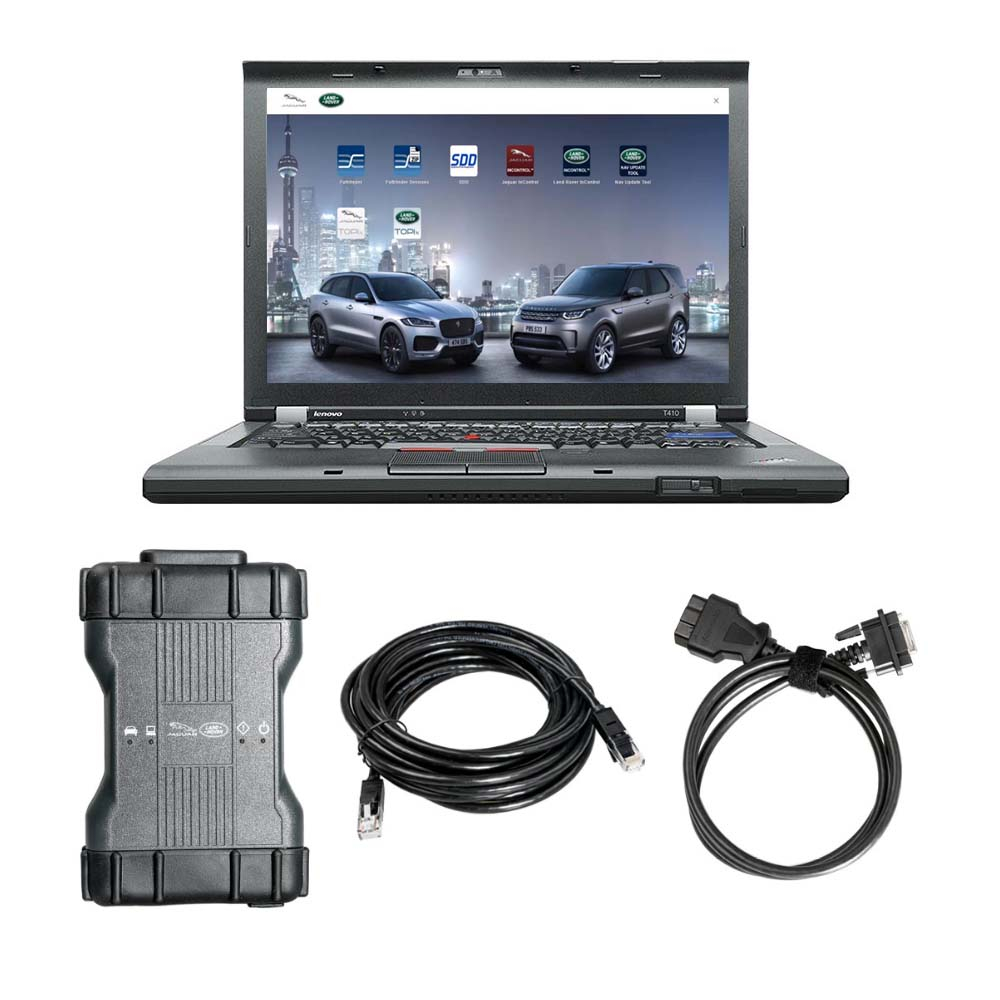
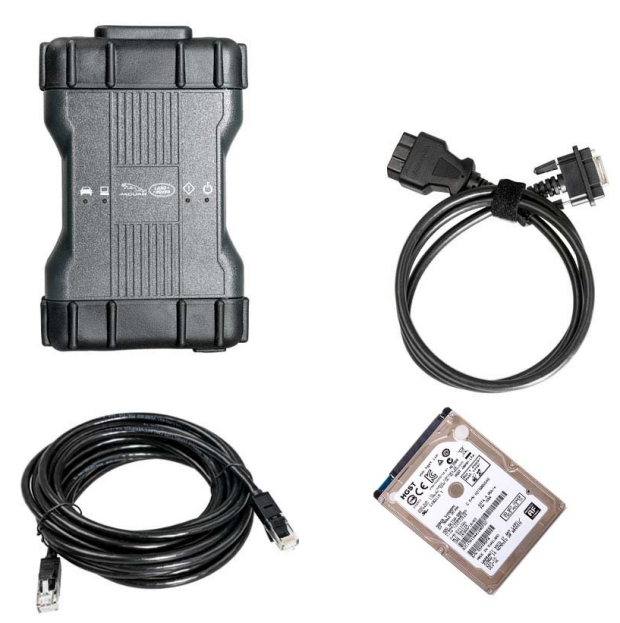
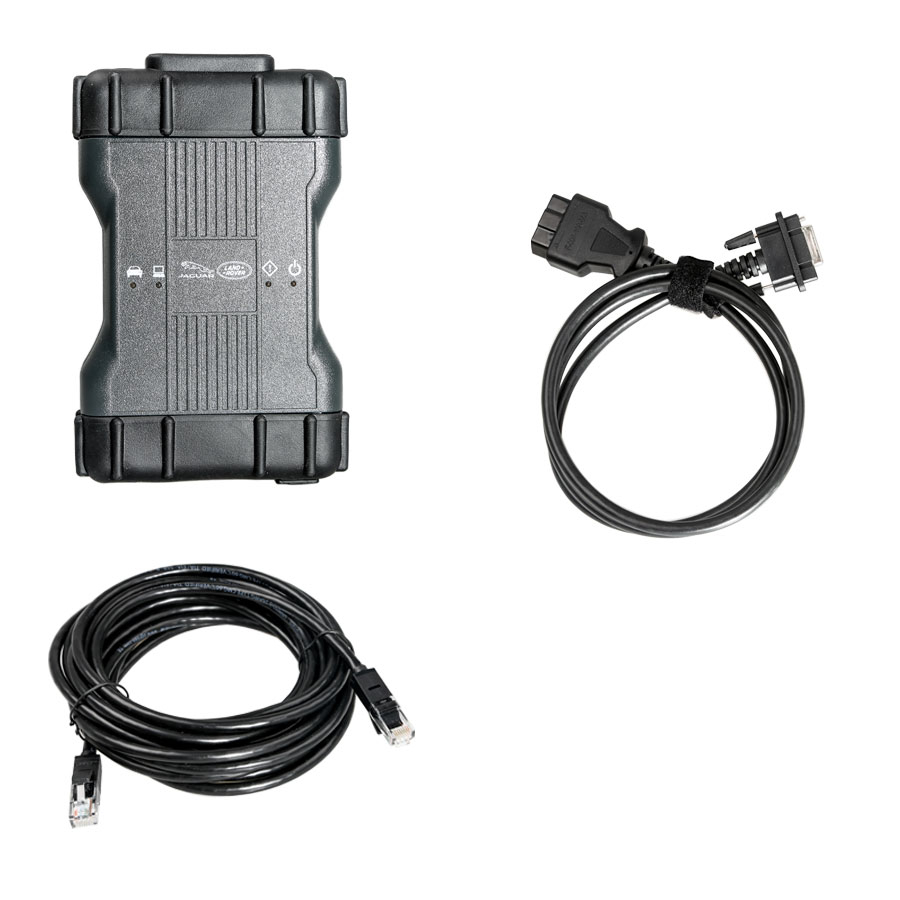
Original JLR DoiP VCI SDD Pathfinder Interface for Jaguar Land Rover 2022 Year -1 Original JLR DoiP VCI SDD Pathfinder Interface for Jaguar Land Rover 2022 Year -2 Original JLR DoiP VCI SDD Pathfinder Interface for Jaguar Land Rover 2022 Year -9
The new JLR approved DOIP VCI is the only unit that will be compatible with Pathfinder and all JLR vehicles with the new vehicle architectures (from the Range Rover/Range Rover Sport (L405/L494) 17MY onwards) Jaguar S-Type Jaguar F-Pace 17MY onwards or allow the enhanced diagnostics that Pathfinder will offer the retailer.

Functions:

Work with all Jaguar & Land Rover models after 2005 year.
Work with the models after 2017, support Pathfinder software application
Work with the models before 2016, support SDD software.
Support all of the SDD’s diagnostic & programming protocol.
Support all of the Pathfinder’s diagnostic & programming protocol
Support Pathfinder activation service offline.
Support WIFI connection
Support VBF file edit
Support EXML file edit
Support SDD engineering software application
Support Pathfinder engineering software application
Support online programming, coding & key programming
SDD software can update to the newest version in the assistance of manufactures’ engineer, and perform online programming.
Pathfinder can update to the newest version in the assistance of manufactures’ engineer, and perform online programming.
Can replace JLR VCI box
Can replace JLR DoIP VCI box

Product Overview:
-Jaguar Land Rover Approved device
– Replacement for JLR SDD VCI’s
– Covers CAN, MultiCAN, ISO9141 and SCP Vehicle Networks
– Suitable for Legacy, Current and Future Vehicles
– 2m USB Cable as standard included
– Easy to update for J2534 new functionality updatesThe JLR VCI connects directly to the vehicle OBDII (Diagnostic) connector, it then connects to the laptop via a USB cable for use with SDD. Once the J2534 DLL files are loaded, this product will allow normal operation with JLR SDD Diagnostic Tool. All communication is possible on with this device.

How does the Original JLR DoIP VCI get updated for future Software Updates?

Periodically JLR will release updates to its products’ drivers and software. These updates are necessary to either release further device functionality or to resolve field issues.
The updating of the drivers and software is handled by the diagnostic test application which will install the updates on request.
If problems are experienced during device use, always make sure that the latest device software and drivers have been installed.

Original JLR DoIP VCI Vehicle Coverage:

The JLR VCI is suitable for use with all JLR vehicle models with the following exceptions:
Flash programming of Engine Control Modules (ECMs) on XJS and pre-2003 XJ and XK models (AJ16, AJ26, AJ27 engines).
Simultaneous logging of ECM and TCM datalogger signals on 2006my Range Rover.

In addition to the 17MY vehicle line applications, the DOIP VCI will be capable of interfacing with 14-16MY Multi-CAN architecture vehicle lines on the Pathfinder diagnostic system.
Software Name    Vehicle Name    Model    Years    Support System Function
SDD2    Land Rover    L326    2015~2016    All
L319    2015~2016    All
L320    2015~2016    All
L322    2015~2016    All
L359    2015~2016    All
L405    2015~2016    All
L494    2015~2016    All
L538    2015~2016    All
L550    2015~2016    All
Jaguar    X100    2015~2016    All
X150    2015~2016    All
X152    2015~2016    All
X202    2015~2016    All
X250    2015~2016    All
X350    2015~2016    All
X351    2015~2016    All
X400    2015~2016    All
Pathfinder    Land Rover    L405    2017~latest    All
L494    2017~latest    All
L462    2017~latest    All
Jaguar    X152    2017~latest    All
X761    2017~latest    All
X760    2017~latest    All
X260    2017~latest    All

FAQs:

Q 1:Must I have the JLR online dealer account to use this tool?
A 1:Yes

Q 2:Which laptop do you recommend to work with JLR DoIP VCI Pathfinder Tool?
A 2:No particular laptop, the more higher configuration the more better.

Q 3:There are two software in the HDD?
A 3:Yes,Pathfinder software for JLR vehicle after MY2018 ,JLR SDD software for MY2014-2018.


Read more

—————

29/06/2022 15:07

Yanhua Mini ACDP + Module 13 Clone VW Audi VL381(0AW) Gearbox

Yanhua Mini ACDP Programming Master WIFI For BMW CAS1 CAS2 CAS3 CAS3+ CAS4 CAS4+FEM BDC IMMO Key Programmer and Odometer

How to Program refresh BMW keys with Yanhua Mini ACDP on Win7 & Win10-1
https://www.cnautotool.com/goods-6686-Yanhgoods-6686-Yanhua+Mini+ACDP+Programming+Master+WIFI.html
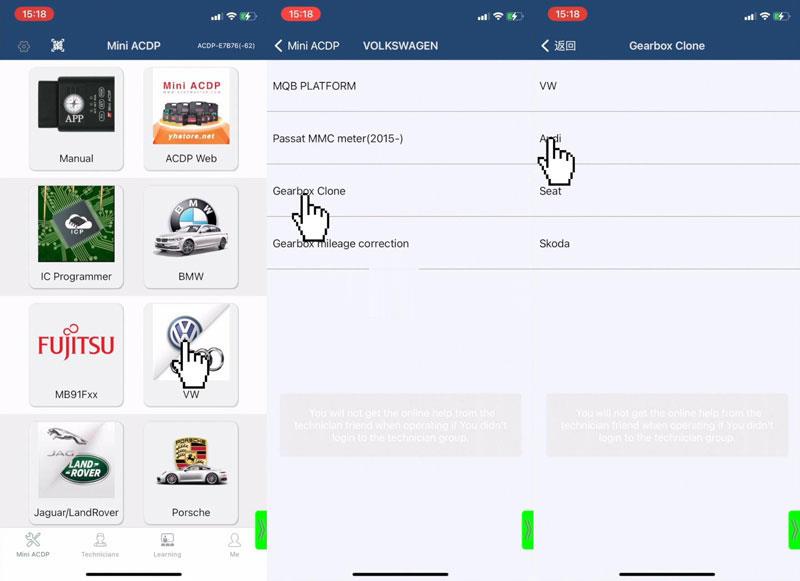
How to use Yanhua Mini ACDP + Module 13 clone Volkswagen/ Audi VL381(0AW) gearbox?


Module 13 also supports DQ200(0AM/0CW), DQ250(02E/0D9), DL382(0CK), DL501(0B5) models as well.

Check full operations on Youtube:

https://youtu.be/gegm1lya7ng

Operation Process
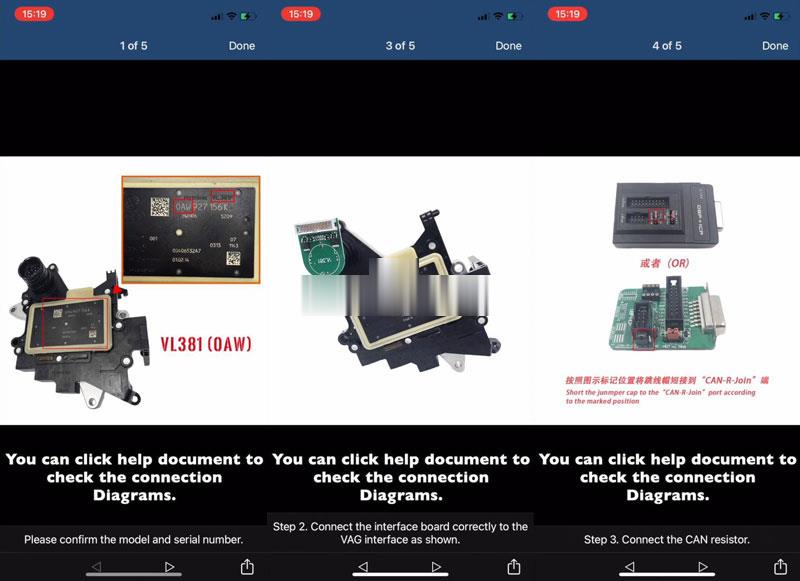
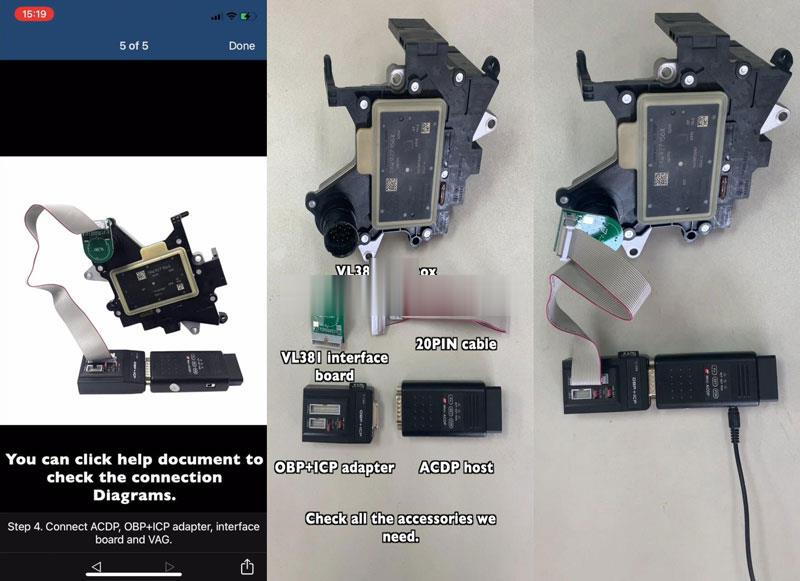
To check the connection diagram, please click “Help”.
Please make sure the model & SN is correct;

Tool Required:
VL381 gearbox
VL381 interface board
20PIN cable
OBP+ICP adapter
ACDP host

Install the interface board. Short circuit the CAN resistor on the OBP+ICP adapter to the “CAN-R-JOIN”.
yanhua-mini-acdp-module-13-clone-vw-audi-vl381-0aw-gearbox-1 (2)

yanhua-mini-acdp-module-13-clone-vw-audi-vl381-0aw-gearbox-2 (2)

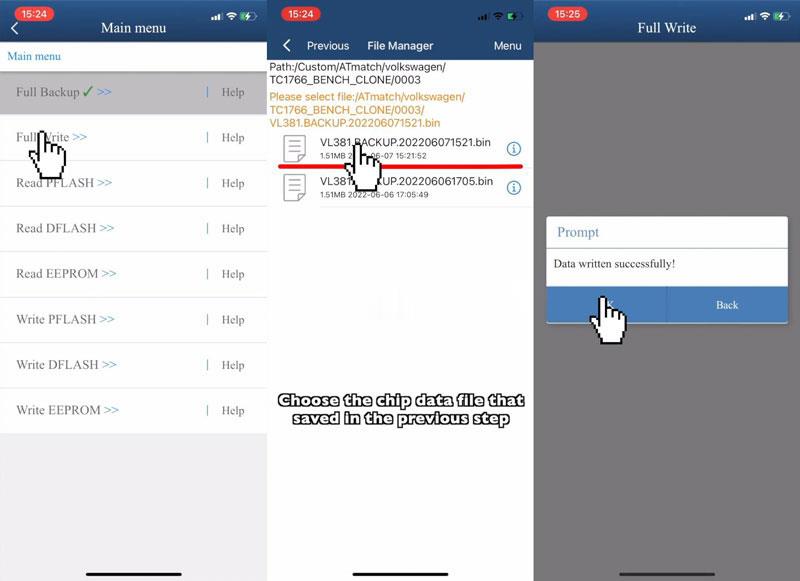
Step1. Read & Backup Data
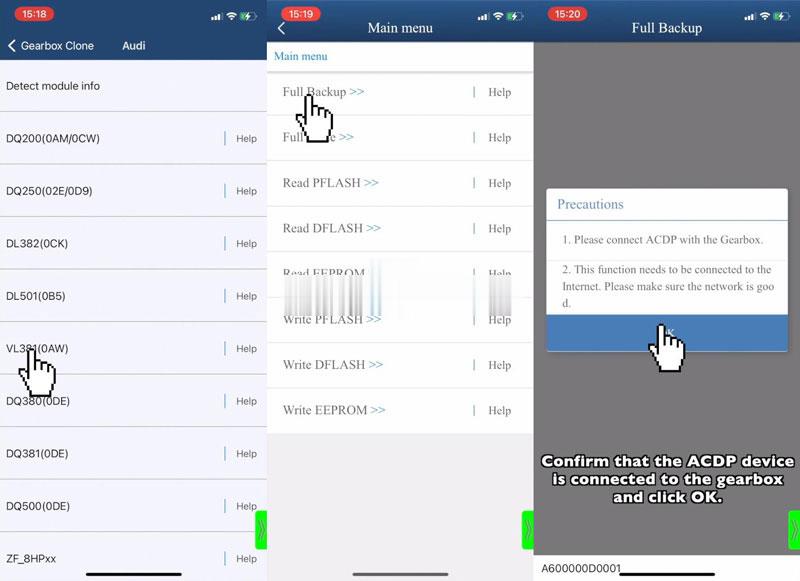
Mini ACDP >> VW >> Gearbox Clone >> Audi >> VL381(0AW) >> Full Backup
1. Please connect ACDP with the gearbox.
2. This function needs to be connected to the Internet. Please make sure the network is good.

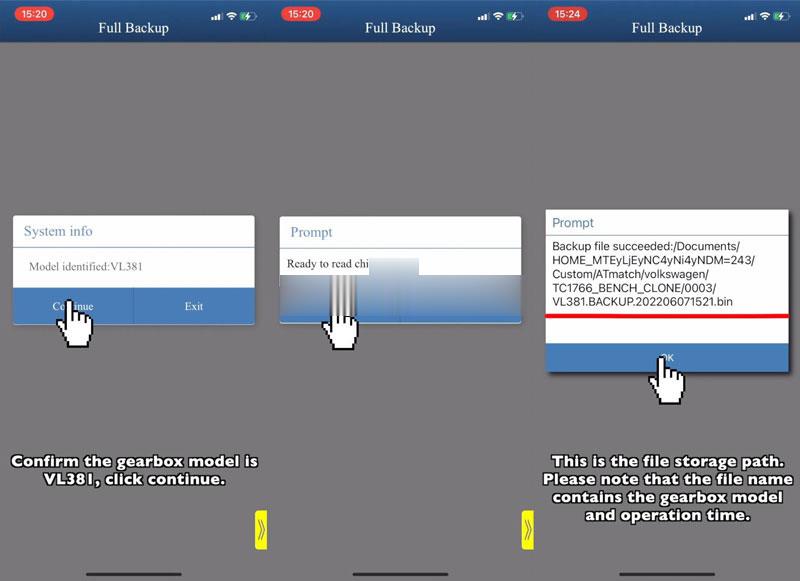
Confirm gearbox model, press “Continue”.
Read to read chip data, press “OK”.
Please save the chip data, press “OK”.
*(Please noted the file name contains gearbox model & operation time)
yanhua-mini-acdp-module-13-clone-vw-audi-vl381-0aw-gearbox-3 (2)

yanhua-mini-acdp-module-13-clone-vw-audi-vl381-0aw-gearbox-4 (2)

yanhua-mini-acdp-module-13-clone-vw-audi-vl381-0aw-gearbox-5 (2)

Step2. Write Data
Connect the new VL381(0AW) gearbox.
Full write >> OK >> Continue >> OK >> Load data file
Data written successfully!
Completed.
yanhua-mini-acdp-module-13-clone-vw-audi-vl381-0aw-gearbox-6 (2)
Any need please feel free with us sale@cnautotool.com, thanks


Read more

—————

23/06/2022 09:53

Remove 4JJ1 Engine from ISUZU N-Series Truck

how to remove 4JJ1 engine from ISUZU N-series truck.For more guide about ISUZU,please refer to:ISUZU Trouble Repair.

Related Contents:
ISUZU US-IDSS II 2020 2019 Diagnostic Software Free Download

Precautions when installing or removing the engine

Always apply chock blocks to the vehicle wheels.

Select an engine hoist that is able to withstand the weight of the engine.

Do not get under the engine while it is hoisted.

Never put your hands where they can get easily caught.

Procedures:

1.Disconnect the battery cable negative terminal.

2.Drain the engine coolant.

3.Remove the starter.

Refer to “Starter Motor”in Section 1E, Engine Electrical.

4.Remove the front exhaust pipe and exhaust brake.

Refer to “Exhaust Pipe”and “Exhaust Brake”in Section 1G, Engine Exhaust.

5.Remove the transmission.

Refer to “Smoother Transmission Assembly”in Section 5B, Automatic Transmission (Smoother)

for details on the Smoother vehicles.

Refer to “Transmission Assembly”in Section 5C, Manual Transmission, for details on M/T vehicles.

6.Remove the air intake pipe and hose.

Remove the hose on the intercooler side.

Remove the pipe from the turbocharger with the hose attached.

8.Disconnect the boost sensor connector(1) and harness clip.

9.Disconnect the ECM connector and clip.

10.Remove the air intake duct and hose.

Remove the duct on the intercooler side.

Remove the duct from the intake throttle valve with the hose attached.

11.Remove the radiator upper hose.

12.Remove the A/C compressor.

Remove the A/C compressor drive belt.

Remove the compressor from the A/C compressor bracket.Fasten to any suitable position with a wire along with the hoses.

13.Remove the engine ground cable from the frame.

14.Remove the vacuum hose(1) from the vacuum pump(2).

15.Remove the radiator lower hose at the engine side.

16.Remove the fan guide.

Refer to “Water Pump”in Section 1C Engine Cooling.

17.Remove the cooling fan assembly.

18.Remove the power steering pump.

Remove the power steering pump at the engine side with the hose attached.

Fasten the power steering pump with hose attached to any suitable position with a wire.

19.Disconnect the heater hose (2) from the heater pipe(1).

20.Install the engine hanger.

Remove the EGR valve harness clip(1).

Install the engine hanger to the rear left side of the engine.

Special Tool Engine hanger:5-8840-2861-0

21.Remove the fuel hose.

Drain the fuel from the fuel filter.

Remove the hose at the fuel filter side.

22.Remove the mounting bolts on the chassis frame side of the engine mount.

Before removing the engine mount, use the hoist to suspend the engine.

Legend

1.Leaf rigid suspension

2.Wishbone suspension

23.Remove the engine assembly.

Slowly operate the hoist to raise the engine to the top surface of the chassis frame.

Turn the engine 90 and move it from the chassis frame top surface to remove the engine assembly.

 
https://www.cnautotool.com/blog/2022/01/06/how-to-remove-4jj1-engine-from-isuzu-n-series-truck/

Read more

—————

13/06/2022 15:11

Porsche PIWIS 3 Notes

The Porsche PIWIS 3 (PST3) is the newest Diagnostic Tool in the market. It can read trouble code, clear trouble code, shows ECU information. It test live data, display actual values, and programs.


The Porsche PIWIS 3 (PST3) Tester III Diagnostic Tool :
1. Exclusive support for Porsche third generation diagnostic PIWIS 3
2. New DoIP Ethernet diagnostic technology
3. Luxury car diagnosis, ultra low threshold
4. Support Porsche Models after 1996.
Update method : Send SSD back or buy a new SSD

Power-on password :123456

Notice:
1. The SSD cannot be copied.
2. Piwis 3 Software SSD can ONLY use as internal disk, NEVER use as external hard drive, otherwise it will be useless and damage the SSD.
We don't provide after sale service once the SSD used as external hard drive.
3. Laptop Specs Requirements: Lenovo laptop (1920*1080 resolution memory 4G I5CPU or above)
We standard package with laptop comes with Lenovo Yoga S1 i5 8G laptop is recommended.

4. This is hardware with software, if you need Piwis iii with laptop complete ready to use, please click: https://www.cnautotool.com/goods-6976-Porsche-Tester-III-Diagnostic-Tool-Piwis-3-Software-Installed-Laptop.html

5. Not support install printer on the hard disk yourself , its was protection , if you need install printer , please tell us in advance with your printer dirve , then we will install printer drive for you before the shipment  

Multi-Language: German, English, US English, French, Italian, Spanish, Japanese, Chinese, Russia, Portuguese, Nederlands


CnAutotool.com offer PIWIS Tester III Porsche PIWIS 3 Software, need know Piwis 3 Price just contact us


Read more

—————


Contact

cnautotool